


How to Change the Default Browser on iPhone iOS
Among all the iOS 14 features announced by Apple at WWDC 2020, the one that impressed users was the ability to change the default browser and mail app on iPhone and iPad.
This means that you can use email applications such as Outlook and Gmail and browsers like Google Chrome and Firefox as default applications instead of Mail and Safari on the iPhone, allowing users to easily synchronize their data between all devices.
Whether they are a desktop computer (Windows or Mac) or a tablet, Or a mobile phone (Android or iOS system).
 |
| How to Change the Default Browser on iPhone | iOS 14 |
And iOS 12 was permitted to delete
the default iOS apps from the iPhone. However, it still required users to use
default apps for email and web browsing requirements. But that’s changing now
since iOS 14 was released to the public, and Apple recently added this feature
to iOS 14 beta 8.
Of course, the Safari and Mail apps
on the iPhone and iPad aren’t that bad to use, but they don’t give us
everything we need either. It is always a good idea to have alternative
options.
If you have a Windows laptop or Android tablet, there is no way to
enjoy the same email experience or sync browsing history on these devices if
you use Safari on your iPhone.
Therefore, Apple changed its position and
announced that it would allow users to set their preferred browser (Google
Chrome, Firefox, etc.) and Mail application (Gmail app) as the default
setting on the iPhone. Here are the steps you must follow to change the default
browser application on the iPhone.
You may like to see: How to fix iCloud Backup could not be completed on iPhone?
How to change the default browser app on iPhone
First of all, this feature only
works with Chrome but the steps will be the same with other applications. But
remember that all third-party browser apps must be updated first to take
advantage of this feature in iOS 14.
- Open Settings app on iPhone
- Scroll down to Chrome Default
Browser App - Select Chrome from the following
list.
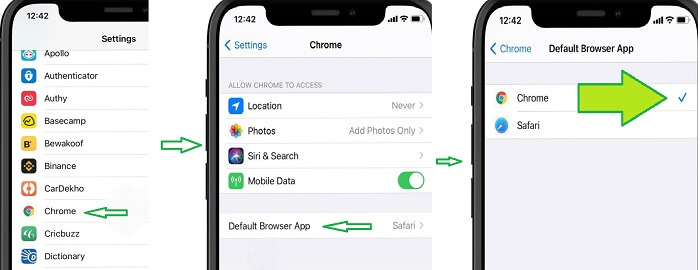 |
| Chrome Default Browser |
And after Apple announced this new
feature, iOS will use Google Chrome as the default browser application on the
iPhone. You will also use the browser you set as the default to open web links
from third-party applications. And when you perform a web search, the results
will provide an option to open the web search with Google Chrome.
You may like to see: How To Fix Gmail Account Error on iPhone?
The ability to change the default
browser is one of the many features Apple announced at the WWDC online-only
event.
Note: This feature comes with the
latest beta version of iOS 14. As of now, it is limited to changing the default
browser on the iPhone to Google Chrome.
Doesn’t work with Microsoft Edge,
Opera, Firefox, or Brave. We will have to wait for the developers to update
their browser apps to enjoy the new changes.
how to set default browser on iphone ios 14, how to change default browser ios 14, how to set default browser on iphone ios15 , iphone 12, iphone 13, set safari as default browser ios 14.
How to set default browser ios 14, change default browser ios 13, ios 14 change default apps, make chrome default browser ios 13, how to change default mail app ios 14.
Change default browser ios 14, set safari as default browser ios 14, change default browser ios 13, set default browser ios 14, make chrome default browser ios 13.
How to change default mail app on iphone ios 14, how to set default mail app ios 14, how to change default mail app ios 14, change default browser ios 13, set safari as default browser ios 14, make chrome default browser ios 13.
Change default browser iphone ios 14, how to set default browser on iphone ios 14, ios 14 change default apps, make chrome default browser ios 12, how to make safari default browser on iphone.
