


How to Fix Cydia Impactor Error 168: provision.cpp:168 error -iOS
Sometimes, Cydia Impactor
will display an error installing the application, such as ‘provision.cpp: 168’.
This type of error does not correctly describe the problem, which is why many
users when installing have confusion about what is causing this error. On this article,
we will review five solutions that can help you overcome this error.
 |
| Fix Cydia Impactor Error 168: provision.cpp:168 error – iOS |
Error provision.cpp:168
- provision.cpp:168
- You already have a current
iOS development certificate or a pending certificate request
Solution:
1.Revoke Certificates
- Cydia Impactorhas an option that allows you to revoke all application certificates installed with your Apple ID. This could be due to a lot of apps being moved with Cydia Impactor, which is why there are some issues found with your Apple ID certificates.
- Connect the iOS device to your computer.
- Open Cydia Impactor.
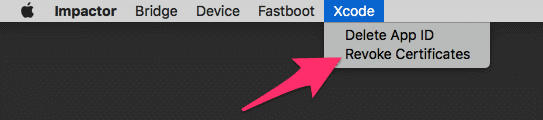
- Click on the Xcode menu as shown in the picture below, then
choose Revoke Certificates.
 |
| revoke certificates |
2.Utilize App-Specific Password
If you have enabled “two-factor authentication” for the Apple ID, you should use the application-specific password when Cydia Impactor requires your account password. Creating an app password is very easy, and it can be done from the Apple website.
- Open this page in any browser and sign in to your Apple ID account.
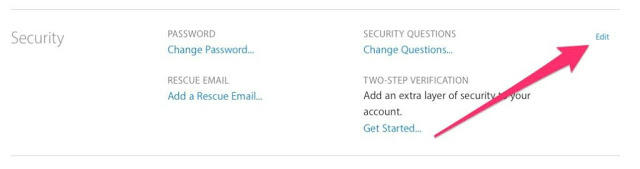
- Scroll down to the Security section and click on the Modify button as shown in the image.
- In this section, find the section “APP-SPECIFIC PASSWORDS” then click Create Password.
- Enter the password, which can be anything and then click on Create button.
- Copy the generated password.
- Now, when Cydia Impactor asks you to enter your Apple ID password, use the password created in the last step.
 |
| edit security |
Every time you want to install the application via Cydia Impactor, you must enter the application-specific password instead of your account password.
3.Install Package Manually
For this option, many users have reported that this method also helps to fix the ‘presentation.cpp: 168’ error. Instead of dragging and dropping an IPA file on to Cydia Impactor, you can use an alternative option called “Install Package” that will do the job right. Here’s how:
- Connect the iOS device
to your computer. - Open Cydia Impactor.
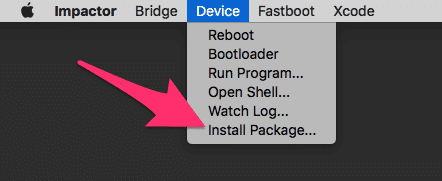
- Click on the Device menu, then choose Install Package as shown in the picture below.
 |
| install package |
4.Create a New Apple ID
It is possible that your Apple ID might be having problems, which is why Cydia Impactor is unable to produce and create certificates for your account. You can override this issue by creating a new Apple ID account, which usually resolves this issue.
5.Computer persification
If none of the above methods work, you should try to use Cydia Impactor on another computer. On your current computer, you may have Internet connection problems or some programs that conflict with Cydia Impactor. Therefore, downloading Cydia Impactor to a different computer may solve the problem, then try installing your IPA file using this computer.
Here are some solutions that we hope will help you fix the ‘provision.cpp: 168’ error that you get in Cydia Impactor.
You may also like to check out
Fix Cydia Impactor Xcode 7.3 Provision.cpp Error
How to license and install the IPA Application by iOS device via Cydia Impactor on iPhone
How to Crack Miracle Box Without Box: Download XTM_Miracle Thunder 2.82 for Free
Fix Cydia Impactor Runtime Error and Installation.cpp:42 error
Cydia Impactor Errors: fix most errors easily
Download Official Firmware for Huawei Y5 II (CUN-U29-Flash File)
Fix Cydia Impactor Errors
cydia impactor error 168, How to Fix Cydia Impactor Error 168: provision.cpp:168 error, cydia impactor error 173, cydia impactor error 42, Fix Cydia Impactor Runtime Error and Installation.cpp:42 error, cydia impactor error 57.
cydia impactor error 182, cydia impactor error xcode 7.3, cydia impactor error 81 3018, cydia impactor error 71 teams empty, cydia impactor error 173, cydia impactor error 57.
