


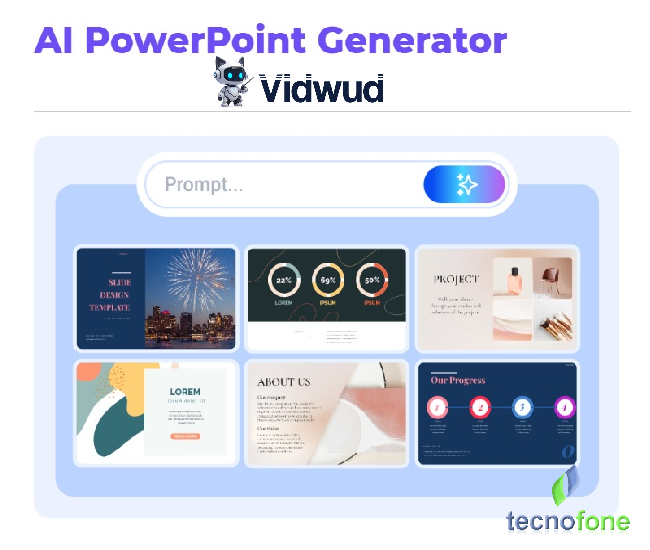
Vidwud is a smart platform powered by AI. It provides free tools people can use to create or edit images, videos, and presentations.
 |
| Create presentations and edit photos with Vidwud AI |
Key AI Tools Available in Vidwud
1. Create Presentations with AI
You can turn written text into neat PowerPoint slides. Just type your content, pick how many slides you need, and choose a template design. Vidwud will handle the rest and make the presentation for you. It offers templates for areas like business, teaching, and marketing. It is free and lets users edit afterward.
2. Replace Faces in Photos and Videos
Vidwud provides a tool to swap faces in photos and videos with ease. You just need to upload a photo or video with a face, along with a photo of the face you want to use, and it takes care of the swapping for you. The process happens fast and delivers results that look smooth and lifelike.
3. Change Faces in Group Pictures
Vidwud makes it simple to swap faces in group photos too. If you have a group shot and want to switch out several faces, you just upload the group photo and the photos of the faces you’re replacing. The system handles the swapping without hassle.
Extra Features
- 100% Free: You don’t need to pay or subscribe to use the tools.
- Multi-Device Capability: You can use this site on any internet-connected device without issues.
- Easy Interface: The site is designed to be simple making navigation and use straightforward.
- Multiple Features: Besides the tools already listed, you’ll find others like turning images into videos, making animated GIFs, and using AI to assess attractiveness.
Build a Fast and Simple AI Presentation | Vidwud
Artificial intelligence (AI) changes how people work and create materials. It helps with repetitive jobs and generates creative content making processes faster and boosting efficiency.
Talking about slideshows, AI makes it easy to create eye-catching slides or presentations in just minutes. You don’t need special design knowledge anymore to make them look professional.
One great example of this shift is Vidwud! This article will walk you through Vidwud’s AI-driven slideshow tool and let you explore a creative process.
How Sites for AI Presentations Function
AI-based presentation makers use smart algorithms to speed up and simplify creating presentations. These tools take the information you give them—like text or highlights—and apply AI methods to turn plain content into polished slides. They organize layouts, pick stylish fonts, and suggest fitting images making the slides both engaging and personalized.
Stop spending hours fixing layouts or hunting for pictures. An AI-driven slide maker handles all that so you can concentrate on building your presentation.
Top AI Presentation Tool – Vidwud
Vidwud ranks among the top AI tools to create presentations.
This tool offers a simple and effective way to speed up and simplify the slide creation process. It combines advanced technology with an easy-to-use design, making it suitable for both amateurs and experts.
Features of Vidwud:
- Automatic Slide Builder: Add your text or images, and Vidwud will generate slides with a seamless and polished style.
- Personalization: It provides options to customize templates, fonts, and images. This helps match the needs of each user.
- Advanced AI: Vidwud’s AI suggests layouts that fit the content type. It makes sure presentations look impressive.
- Accessibility and Ease of Use: Anyone can use its interface without needing any special tech skills.
Why pick Vidwud?
There are countless slideshow tools out there, but their quality often differs. Vidwud offers some clear advantages when making slideshows:
- Speed and Efficiency: Vidwud saves hours by turning your ideas into slides.
- Free to Use with No Limits: You can create slideshows with AI at no cost. Anyone can make slides fast and get appealing results in moments.
- High-Quality Outcomes: AI makes sure your slides have a polished and stylish look with modern designs that grab attention.
- Easy to use: You don’t need to be a design expert to try Vidwud. Its simple design makes it easy to use for beginners.
- Works for Anything: Vidwud fits all kinds of needs, whether you’re preparing for a business pitch, teaching a class, or sharing research findings.
- Always Improving: Vidwud gets regular updates to bring you fresh features and cutting-edge presentation tools.
Common Questions
- What process does Vidwud use to create slides?
Vidwud uses AI to review the content you share and turns it into slides. It adjusts layouts, fonts, and visuals to create attractive and unified presentations. - Do I need to know design to use Vidwud?
No, Vidwud is simple to use. Its AI handles the designing process so you only need to make small tweaks if you want. Even first-timers can create polished presentations due to Vidwud’s user-friendly interface. - Can I make presentations for work with Vidwud?
Yes, Vidwud works great to build professional business presentations. It delivers sleek designs to help you communicate.
Conclusion
To create and edit images, videos, and presentations with artificial intelligence, Vidwud serves as a great option. This tool works well for both beginners and professionals who want something free and simple to use.
