


What do You Know About Gmail Business Email Account | Gmail Paid Account
Gmail is Google’s email service.
With over 1.5 billion active users, one of the most popular email platforms in
the world, Free Gmail accounts from Google are not designed for communications
and collaboration at the business or enterprise level. Ads-supported free
accounts are also criticized for privacy concerns.
Personal emails don’t look
professional.
When you need to contact a
business, do you want to contact “[email protected]” – or
“[email protected]”?
Therefore, when creating your
commercial company, you will need a professional business email, and it is good
that Google launched the business email service, which is now called the G
suite, and it is a production group from Google that allows you to use Gmail
with your business email address.
Google paid G Suite (like Google
Apps— Google changed name in 2016) provides secure, ad-free email. You can also
access other Google services like Calendar, Drive, Docs, Sheets, Forms,
Hangouts Chat and more.
G Suite can work with everyone,
from entrepreneurs to big companies. You can have multiple email addresses,
increased security and privacy, more storage, and real and realistic support
In the corporate mail field you
have complete control over all mailboxes and their contents, and you can
enforce a set of rules for sending or receiving company mail.
Sending all business emails from
the business email address allows creating a corporate identity, and increasing
the company’s credibility and reputation.
Emails from one domain refer to
the company’s website address, which is associated with the same domain.
Switching to a branded business
email is not only more professional, but a simple way to instantly help your
business stand out.
And to get a professional
business email address, you will need a domain name and a website, and that is
what we will explain in the next article, which is how to create a professional
business email for small and large businesses.
You may like to see: Create New Gmail | win $1000
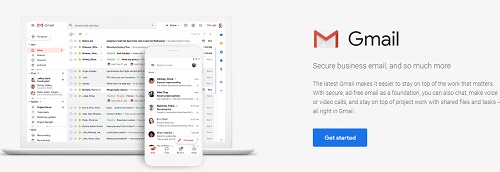 |
| Business with or without Gmail Business Email Account |
The difference between free Gmail and Gmail for Business (G Suite) features and Benefits
Free Gmail features
- Effectively filter out spam
- virus protection
- 15 Gb storage of a free Gmail Account
- Ability to access email via mobile devices
- Built-in chat
- Organize your email inbox via Customizable
tabs - Themes to change the background and the look
of Gmail - Video calls
- You can view attachments within the email and
downloading it - The free Gmail is supported by ads.
You may like to see: How To Fix Gmail Account Error on iPhone
Gmail for Business (G Suite) features and Benefits
- A professional business email address to work
on your domain - When creating a Gmail for Business account,
your employees won’t have to get used to something new when using G Suite, as
it is just a commercial version of Gmail, which is familiar to many people. - With G Suite, you have complete control over
company accounts. If one of your employees leaves the company, you can access
any account, all messages, contacts, and files stored. - Share documents and contacts with the entire
team in a few clicks. - G Suite allows each user to create up to 30 Gmail business email aliases
- 30 GB storage per user- Double the storage
capacity of free Gmail account - G Suite provides 2-step verification,
increasing the security of your Gmail business account - Since your email address uses your domain
name, everyone who receives an email from your company will see the brand name
for your company domain every time. - 24/7 customer support;
- No advertisements
- Free 30 days trial;
- You can mark the mail account interface with
the company logo. - Manage email even offline with the Gmail app
on mobile devices. - Works anywhere on the web, mobile, tablet,
etc. - Works great with Outlook and can also sync
old Outlook accounts. - Use Google Calendar and Google Hangouts to
chat, video, and voice calls at your business email address. - It works seamlessly with your WordPress site.
- Most of all, higher delivery, no delay,
never-ending up in the spam folder
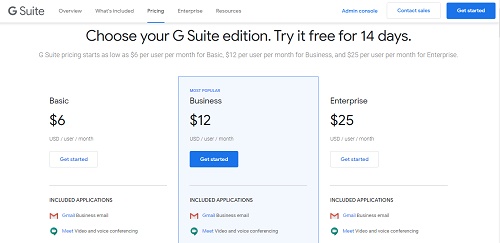
Gmail Business email (G Suite) Pricing
 |
|
Gmail Business email (G Suite) Pricing |
You can choose from three types of G Suite pricing:
- Basic, $6 per user (30 GB Google Drive
storage, advanced administrative controls, and security) - Business, $12 per user (unlimited Google
Drive storage, advanced admin and security controls, IDE programming, some
analytics tools) - Enterprise, $25 per user (unlimited Google
Drive storage, advanced administration, and security controls, scripted IDE,
advanced analytics tools) - You can pay annually, then get two months
free ($ 50 per year per user). - G Suite also offers a 14-day free trial,
which allows you to test everything before you decide. It’s all the powerful
features that you’re used to in Gmail, Drive, Calendar, etc. (but now it’s for
your business).
Just visit the G Suite website and click the start button for the plan you want to use.
How to Create Gmail Business Email Account
Gmail business email free, gmail business email price, gmail account, create new gmail account, free business email, how to create a business gmail account, free business email without domain, gmail business login, gmail for business free, create gmail, free business email without domain, how to create a business email in gmail, how to create your own email domain free, business email address examples, g suite, free business email address, gmail for business free, create new gmail account, g suite, free business email without domain, how to create a business email in gmail, google account, google business account, gmail business email price
