


How to Fix Cydia Impactor Runtime Error and Installation.cpp:42 error
 |
| Fix Cydia Impactor Runtime Error and Installation.cpp:42 error |
1. Cydia Impactor runtime error:
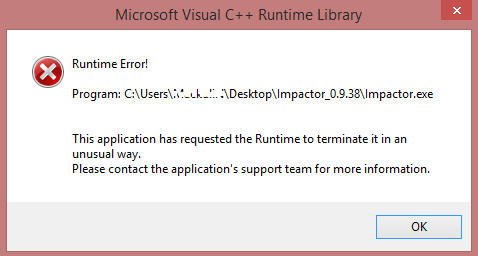 |
| cydia impactor runtime error |
Error:
- runtime error!
- This application has requested the Runtime to terminate it in an unusual way.
Solution:
- Install Visual C++ Redistribution latest version.
2. installation.cpp:42 error
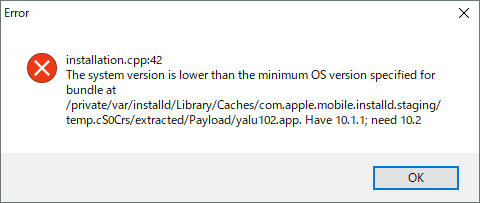
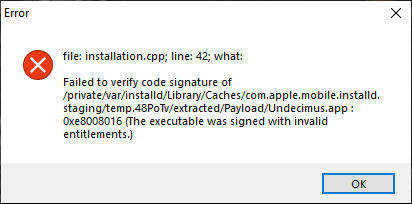
Sometimes, Cydia Impactor will display an error installing the application, such as installation.cpp:42 error this error can throw up one of two messages – one telling you the “system version is lower than the minimum specified for_directory” and the other telling you that the code signature wasn’t verified. This could happen because the IPA zip file was dragged and dropped into Cydia Impactor.
Error:
- Cydia Impactor installation.cpp:42
- The system version is lower
than the minimum OS version specified for_directory - File :
installation.cpp;line:42;what:
Failed to verify code signature of
/private/var/installd/Library/Caches/com.apple.mobile.installd.staging/temp.Igza8P/extracred/Payload/spotify++.app:0xe8008016(The
executable was signed with invalid entitlements.)
Solution 1:
- It may be caused by dragging
IPA zip file directly to Cydia Impactor. - Remember to extract the file
before you drag it into Cydia Impactor – only the IPA file is required - Try VPN for making an attempt
with a different region, or it may be that your ISP has detected what you
are doing and blocked it - Utilize another tool for
signing IPA file and sideload that signed IPA using Cydia Impactor. One of the
community members used iOS App Signer to resign yalu.ipa and installed
with the latest Impactor, it worked!
Solution 2:
Majority of community
members are facing the same issue while using Cydia Impactor. Trying out
available different solutions are not leading users to walk away without Cydia Impactor 42 error. But it can be 100% resolved with the following method where impactor
won’t be our handy tool.
members are facing the same issue while using Cydia Impactor. Trying out
available different solutions are not leading users to walk away without Cydia Impactor 42 error. But it can be 100% resolved with the following method where impactor
won’t be our handy tool.
- Go to jailbreaks.fun from your Safari browser.
- Type unc0ver -new beta in the search bar.
- Upon finding the same, click on Get and let it install the app.
- Disable Reload System Daemons and enable Reinstall Cydia Impactor.
- Now perform jailbreak. (Perform multiple attempts if necessary).
You may also like to check out:
How to license and install the IPA Application by iOS device via Cydia Impactor on iPhone
How to Crack Miracle Box Without Box: Download XTM_Miracle Thunder 2.82 for Free
Fix Cydia Impactor Error 168: provision.cpp:168 error in iOS
Cydia Impactor Errors: fix most errors easily
Download Official Firmware for Huawei Y5 II (CUN-U29-Flash File)
Fix Cydia Impactor Runtime Error
cydia impactor error 42, Fix Cydia Impactor Runtime Error and Installation.cpp:42 error, cydia impactor error 57, cydia impactor error 182, cydia impactor error xcode 7.3, cydia impactor error 81 3018, cydia impactor error 71 teams empty, cydia impactor error 173, cydia impactor error 57, cydia impactor error 182, cydia impactor error provision.cpp:81, cydia impactor error lockdown.cpp:57, cydia impactor error installer cpp 71, cydia impactor error update xcode, cydia impactor errors network extensions, cydia impactor error _assert teams.empty, cydia impactor error 22 permission denied, cydia impactor error 51, cydia impactor error 53, cydia impactor error 54, cydia impactor error 79, cydia impactor error 84, cydia impactor error 108, cydia impactor error 122, super impactor, cydia impactor xcode 7.3 error, cydia impactor, please update to xcode 7.3 2021, cydia impactor error 71 reddit, cydia impactor not working, cydia impactor error 71, cydia impactor error 81, cydia impactor alternative, super impactor, cydia impactor error 173, cydia impactor xcode 7.3 error, cydia impactor not working, cydia impactor broken, cydia, cydia impactor, fix cydia impactor errors, cydia impactor alternatives, cydia impactor error installer cpp 71, cydia impactor error 168, cydia impactor error 173, cydia impactor xcode 7.3 error, what is cydia impactor, cydia impactor list teams error, cydia impactor login error, cydia impactor list teams error, cydia impactor broken, cydia impactor down
